eBay · API · Microsoft Azure
eBay Sell API: a practical guide for developers (2026)
When building marketplace integrations, eBay remains a strong channel for sellers who need more than manual listing uploads — especially when the goal is to automate the full flow: catalogue, stock, orders, shipping and financial reconciliation. That is where the eBay Sell API comes in.
The name may suggest a single “sell on eBay” API, but the Sell API is actually a family of REST APIs for the seller side of an integration. For developers, integrators and businesses connecting eBay to ERP, PIM or e-commerce systems, it is the natural starting point for a modern integration.
eBay Sell API at a glance
The Sell API lets external software connect to a seller’s eBay account and automate tasks such as:
- publishing and updating products, prices and availability;
- syncing inventory;
- importing orders and uploading shipment tracking;
- reading payouts and financial movements;
- managing payment, return and shipping policies;
- checking marketplace rules and listing constraints.
The key point: the Sell API is not only about creating listings. It builds an integration layer between your internal systems and the eBay marketplace.
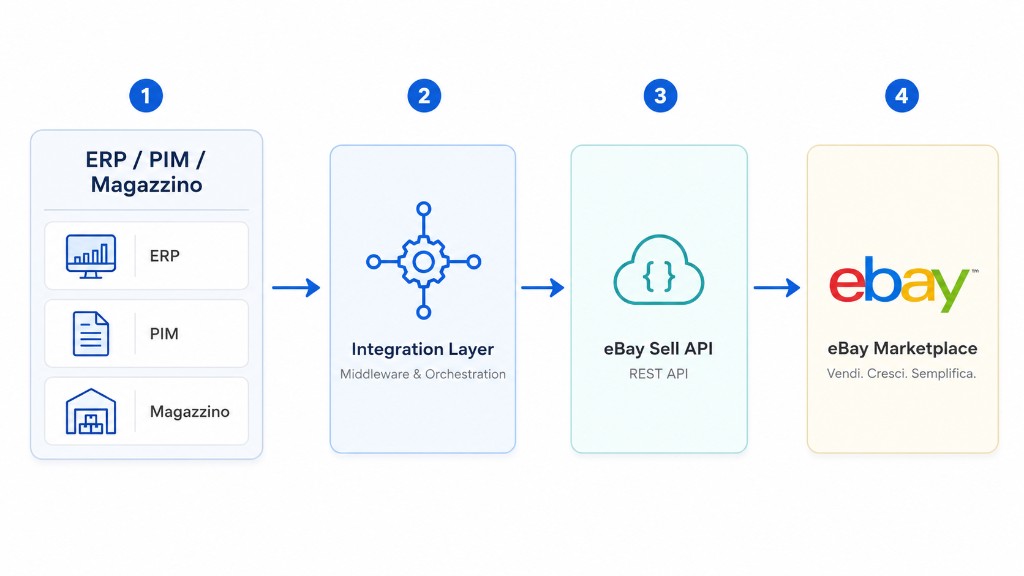
Not a single API
The Sell API is a set of specialised APIs. Each area covers part of the sales cycle:
| Area | Purpose |
|---|---|
| Account | Seller settings: payment, return and shipping policies |
| Inventory | Products, SKUs, stock, prices and offer publication |
| Fulfillment | Orders, shipments, tracking, refunds and disputes |
| Finances | Payouts, transactions, fees and financial movements |
| Metadata | Marketplace rules, categories, conditions and listing constraints |
| Marketing | Promotions, campaigns and advertising |
| Analytics | Reports, performance metrics and traffic data |
| Feed | Bulk and asynchronous operations for large catalogues |
From SKU to live listing
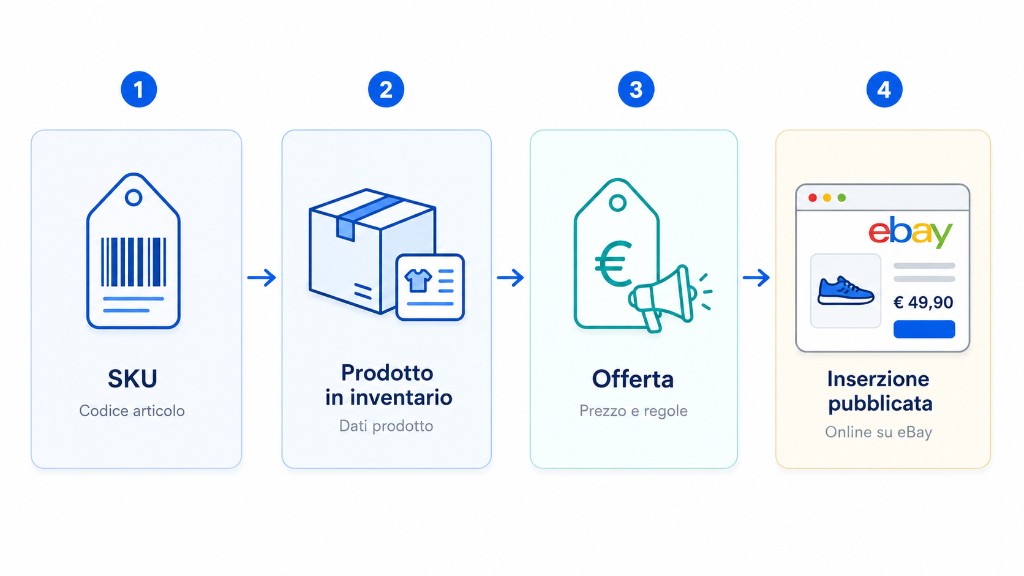
In the modern model, eBay thinks in terms of SKUs and inventory, close to how ERP and warehouse systems work:
- start from a SKU;
- map the SKU to an inventory product;
- create an offer;
- publish the offer as a live eBay listing.
When your back office updates a SKU quantity, the integration can propagate the change to eBay without rebuilding the entire publication flow — the same applies to price, variants and product attributes.
Before you publish: seller account readiness
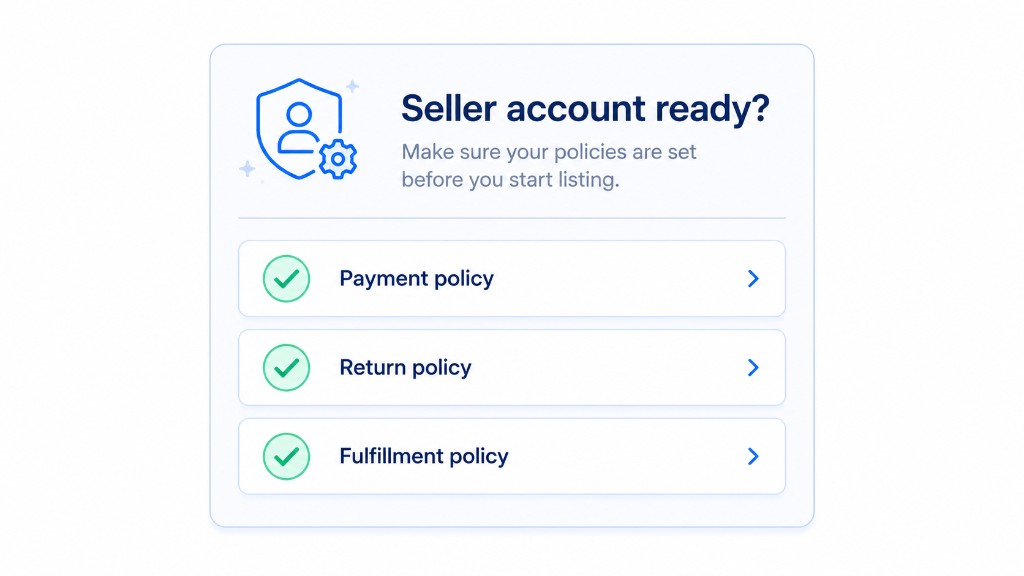
A common mistake is assuming title, price, description and images are enough. eBay relies on policies for payment, returns, shipping, handling times and commercial terms. Missing or incompatible policies cause publication failures.
A B2B integration should verify account readiness first and surface clear errors: missing policy, invalid category, incomplete data or marketplace rule violations.
Orders and fulfillment
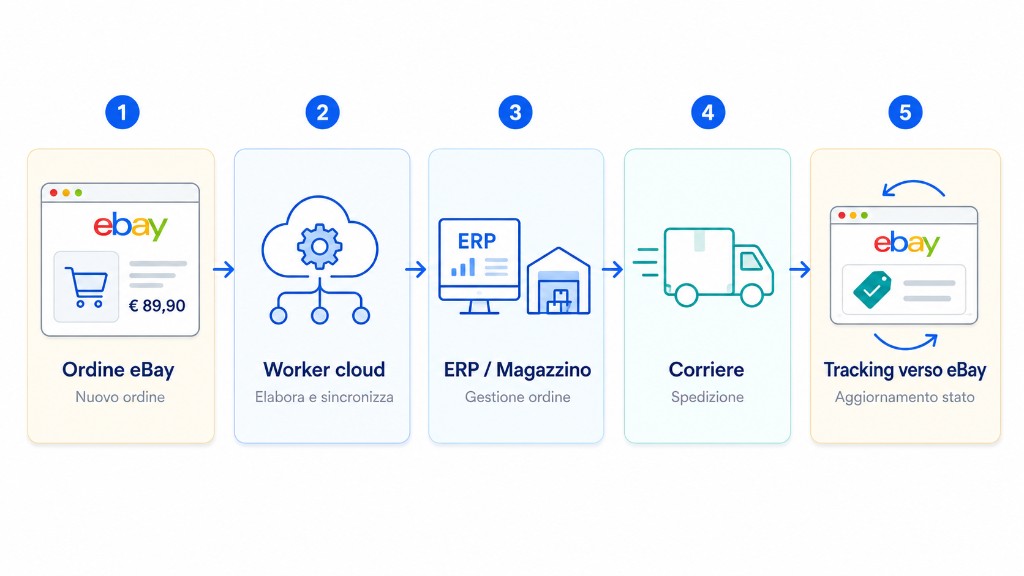
- eBay creates a new order;
- a cloud worker imports it;
- the order syncs to ERP or warehouse;
- the carrier handles shipment;
- tracking is sent back to eBay.
Production integrations should use asynchronous processes: queues, workers, retries, API rate limits and intermediate states. The gap between a demo and a production-grade integration shows up in how well you handle delays, partial failures and systems that are not always in sync.
Orders, fees and payouts
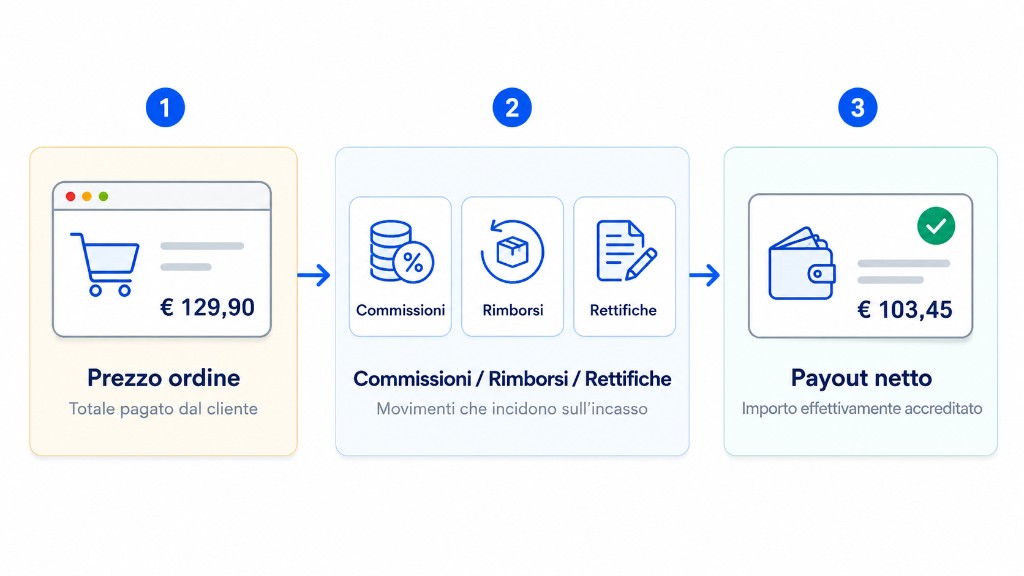
An order amount does not equal what the seller receives. Between customer price and net payout there are fees, refunds, credits, adjustments and timing differences.
To connect eBay with ERP or accounting you need to read and reconcile financial movements, not only import orders. A €129.90 order does not imply an equal net payout.
Marketplace rules and validation
Metadata APIs describe rules that change by marketplace and category: allowed conditions, mandatory attributes, return and shipping constraints, regulatory requirements. An effective listing tool validates data before publication, acting as an intelligent layer between your back office and the marketplace.
Integration architecture on Microsoft Azure
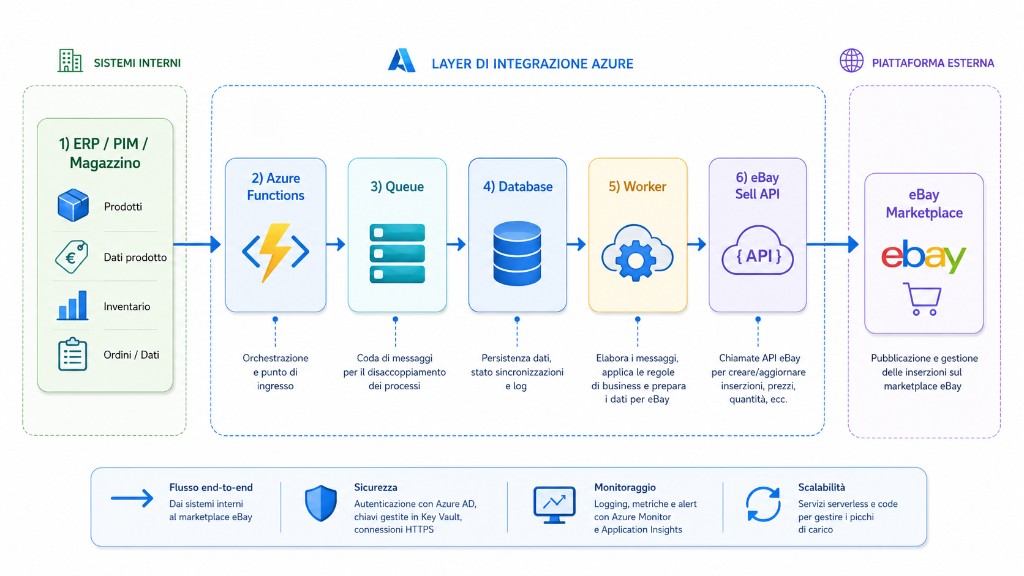
In a real project the Sell API is not called from the frontend. You need an integration layer. On Azure, a typical architecture can include:
- Azure Functions for ingress and orchestration;
- Queue for process decoupling;
- Database for state, logs and sync status;
- Workers for business rules and data preparation;
- calls to the eBay Sell API with monitoring and retries.
Sell API vs Trading API
| Aspect | Sell API | Trading API |
|---|---|---|
| Model | REST and JSON | Legacy, XML-oriented |
| Structure | Functional areas (Inventory, Fulfillment…) | Many operational calls |
| Best for | New cloud integrations | Existing systems and legacy cases |
| Maintainability | Better for new projects | Useful when already built around it |
In 2026, for a new project the Sell API is the natural choice. The Trading API remains useful for legacy integrations or features not yet covered — migration is often gradual.
When to use the eBay Sell API
- ERP ↔ eBay integration;
- multichannel stock sync;
- custom listing tools or marketplace platforms;
- order management and carrier connectors;
- seller dashboards and payout reconciliation;
- promotion and reporting automation.
It becomes especially valuable when your source system already has structured data: SKUs, quantities, prices, orders and accounting movements.
Operational case: ERP stock change to eBay
A real flow does not start from eBay, but from an ERP event. Example: the warehouse removes 3 units for an offline sale; the integration calculates publishable quantity, applies the buffer and enqueues a delta towards the Inventory API.
{
  "eventType": "StockChanged",
  "sku": "ERP-12345",
  "warehouse": "IT-01",
  "physicalQuantity": 12,
  "reservedQuantity": 3,
  "safetyBuffer": 2,
  "publishableQuantity": 7,
  "sourceVersion": "erp-stock-ledger-88421"
}
The worker sends only availability, then stores response and source version. If eBay rejects the data, the event is traceable: you can tell whether the issue is negative stock, unpublished SKU, expired token or invalid category.
Production troubleshooting
| Symptom | Typical causes | Action |
|---|---|---|
| 401/403 | expired token, wrong scope, seller not authorised | renew OAuth and verify RuName/scopes |
| publishOffer fails | missing policies, incomplete category/aspects | block publication and show a data checklist |
| stock not aligned | out-of-order events or buffer not applied | use source version and SKU idempotency |
| payout not reconciled | refund, fee or adjustment arrived after the order | reconcile by transaction, not by order total |
Common mistakes
- treating the Sell API as a single “publish to eBay” button;
- ignoring seller account setup and policies;
- confusing orders with actual payouts;
- skipping async flows with retries and rate limits;
- underestimating pre-publication validation.
Conclusion
The eBay Sell API is the modern foundation for seller-side eBay integrations — an ecosystem around account, inventory, orders, shipping, payouts and marketplace rules. A strong integration keeps products, stock, orders, fees and payouts aligned. It is the backbone of a reliable marketplace integration, especially on cloud platforms such as Microsoft Azure.
Official documentation: eBay Sell API — Overview.