Amazon · SP-API · Marketplace
Amazon SP-API: a practical seller integration guide
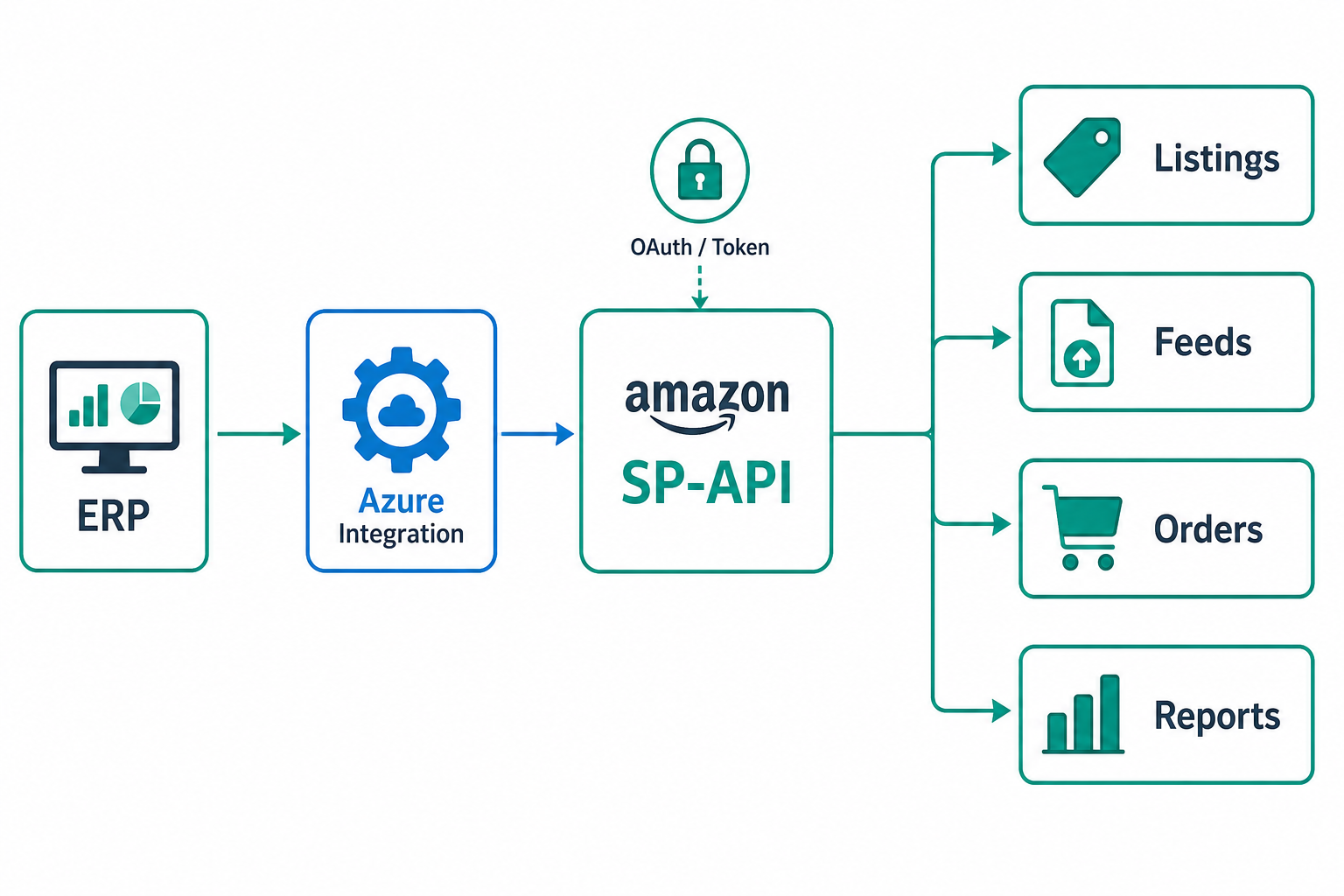
Amazon is an essential channel for many sellers, but its integration has its own rules. The Selling Partner API (SP-API) is the official seller-side interface, and understanding its structure is the first step to building a solid integration starting from the ERP.
Authentication: LWA
Access goes through Login with Amazon (LWA): the application obtains a refresh token during authorisation and derives short-lived access tokens from it. Refresh tokens must be protected (e.g. in Azure Key Vault) and access tokens cached and renewed before expiry.
The main areas
| Area | Purpose |
|---|---|
| Listings Items | Create and update products and offers |
| Feeds | Bulk, asynchronous catalog operations |
| Orders | Import and manage orders |
| Reports | Asynchronous extracts (inventory, sales, settlement) |
| Finances | Financial events and reconciliation |
Listings: targeted, Feeds: bulk
For single, immediate updates use the Listings Items API; for high volume prefer the Feeds API, which works asynchronously: you upload a document, create a feed and monitor the job until you read its result. The choice between the two depends on volume and required latency.
Orders and reports
Orders are imported with the Orders API via incremental polling; many extracts (inventory, sales, settlement for reconciliation) come instead from Reports, also asynchronous: request the report, wait for completion, download the document. The asynchronous pattern recurs, so it is worth standardising.
Rate limits and robustness
SP-API applies limits with a "rate + burst" model. You need client-side throttling, backoff with jitter and idempotency, exactly as with other marketplace APIs. Error handling must distinguish transient (retry) from permanent (fix the data).
Mapping the catalog
Amazon requires specific attributes per product type and identifiers. As with any marketplace, the value lies in the mapping and validation layer from the internal model to the Amazon format, executed before sending to catch errors upstream.
Architecture on Azure
An SP-API integration on Microsoft Azure combines: secure token handling (Key Vault + Managed Identity), scheduled Functions for orders and reports, queues for Feed operations and their asynchronous jobs, workers with retry and rate limiting, and observability with correlation IDs to follow each operation end-to-end.
Practical example: LWA token and Orders call
In production I always separate token retrieval from the application call: the worker asks an internal token service for an access token; that service reads the refresh token from Key Vault, renews it when needed and caches the access token for a few minutes. Application code never sees the refresh token.
POST https://api.amazon.com/auth/o2/token
content-type: application/x-www-form-urlencoded

grant_type=refresh_token
&refresh_token=Atzr|...
&client_id=amzn1.application-oa2-client....
&client_secret=...

GET https://sellingpartnerapi-eu.amazon.com/orders/v0/orders?MarketplaceIds=APJ6JRA9NG5V4&CreatedAfter=2026-06-21T00:00:00Z
x-amz-access-token: <lwa-access-token>
user-agent: erp-marketplace-sync/1.0
Store the response with an idempotency key: AmazonOrderId plus marketplace. If a job is replayed after a timeout, the order must not be duplicated in the ERP.
Operational runbook for asynchronous feeds and reports
- create the feed/report document and store
feedDocumentIdorreportDocumentIdwith an internal correlation ID; - create the job (
createFeedorcreateReport) and enqueue it with statusSubmitted; - poll with backoff: every attempt records status, remaining quota and next retry time;
- on
DONE, download the document, archive the raw file and import only valid rows; - on
FATALor validation errors, stop retrying and send details to the catalog team.
A recurring field case: a 40,000-SKU catalog with hourly price changes. I use Listings for urgent point fixes on a few SKUs, Feeds for nightly mass realignment and Reports to verify what Amazon actually accepted.
Common mistakes
- unprotected refresh tokens or access tokens not renewed;
- using Listings for volumes that would require Feeds;
- order polling without idempotency, causing duplicates;
- no handling of asynchronous feed and report jobs.
Conclusion
SP-API is powerful but asynchronous and rule-rich. Mastering LWA authentication, the Listings/Feeds distinction, the asynchronous nature of orders and reports and the resilience patterns is what makes an Amazon integration reliable. Official documentation: Amazon SP-API (developer docs).