Amazon · SP-API · Notifications
Receiving Amazon orders with SP-API Notifications (instead of polling)
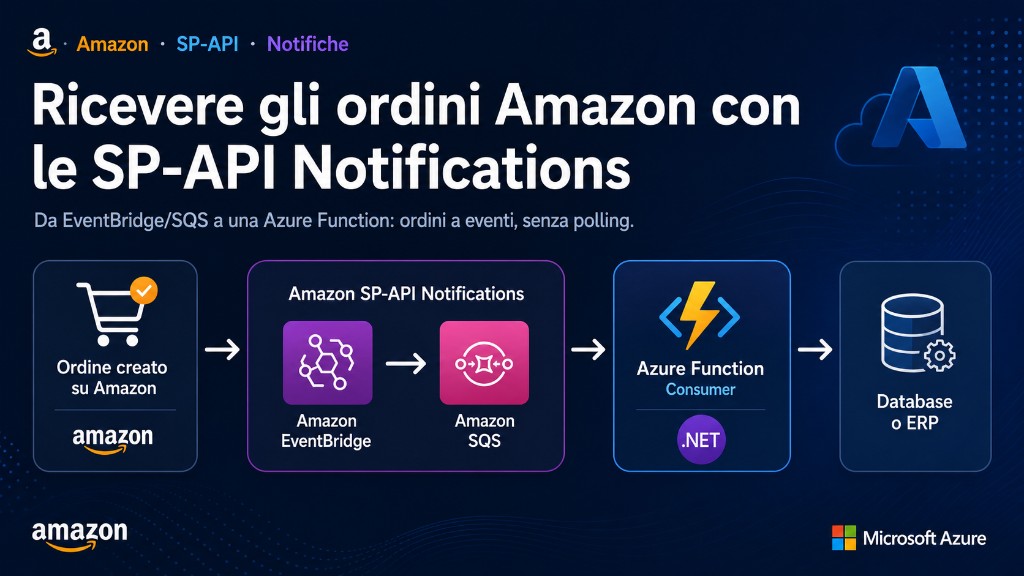
Many Amazon integrations import orders by polling: hitting the SP-API at regular intervals. It works, but it's fragile and late. SP-API Notifications flip the approach: Amazon notifies state changes and you consume them event-driven. This guide shows how to receive them reliably on Azure with a .NET consumer.
Why Notifications instead of polling
- fewer calls and no rate limit wasted on empty polls;
- lower latency: you react when the event happens;
- less cursor and time-window logic to maintain.
How it works: destinations and subscriptions
The model has two steps. First you create a destination with createDestination; then you create a subscription to the notification type you want (for example ORDER_CHANGE). Amazon delivers notifications to its own infrastructure: Amazon EventBridge or an Amazon SQS queue.
| Element | Role |
|---|---|
| createDestination | Registers where Amazon should deliver (EventBridge or SQS) |
| createSubscription | Enables a notification type (e.g. ORDER_CHANGE) on the destination |
| EventBridge / SQS | Delivery point on the Amazon/AWS side |
From the Amazon side to Azure
Notifications land on EventBridge or SQS (AWS side). To bring them into an Azure architecture, a small bridge reads from SQS and republishes to Azure Service Bus, where your workers process them. It's the same pattern described in order ingestion with Azure Functions and Service Bus: decouple receiving from processing and absorb spikes without losing events.
Idempotency and reliability
A notification can arrive more than once: treat everything as at-least-once and make processing idempotent using the order id as the key. The notification is a signal, not the source of truth: on receipt, call the SP-API to read the order's updated state, applying the retry and rate limit patterns for those calls.
Sensitive data: Restricted Data Token
Orders contain personal data (PII). Operations that expose it are restricted and require a Restricted Data Token (RDT), different from the standard token. Plan the RDT flow for calls that read buyer addresses and details, and keep secrets out of the code.
Example SQS to Azure Service Bus bridge
The bridge should not process the order: it should only validate, deduplicate the AWS message and enqueue an internal event. The real processing stays in Azure workers.
public async Task RunAsync(SqsMessage message)
{
    var notification = JsonSerializer.Deserialize<AmazonNotification>(message.Body);
    var key = $"amazon:{notification.NotificationType}:{notification.Payload.OrderId}";

    if (await dedup.ExistsAsync(key))
        return;

    await serviceBus.SendMessageAsync(new ServiceBusMessage(message.Body)
    {
        MessageId = key,
        CorrelationId = notification.NotificationMetadata.NotificationId,
        Subject = notification.NotificationType
    });

    await dedup.MarkAsync(key, TimeSpan.FromDays(7));
}
If the Azure worker fails after reading the updated order, the message lands in the dead-letter queue with correlation ID and original payload. Recovery is much easier than blind polling.
Polling vs notifications: operational comparison
| Aspect | Polling | Notifications |
|---|---|---|
| Latency | depends on the interval, often 5-15 minutes | near-immediate, then internal queue |
| Rate limit | spends calls even with no orders | calls happen only when an event arrives |
| Recovery | requires a robust time cursor | requires deduplication and dead-letter queue |
Common mistakes
- staying on polling "because it works", accumulating latency and rate limits;
- processing synchronously inside the receiver instead of queueing;
- trusting the notification payload as truth instead of re-reading the order;
- forgetting the RDT for operations involving PII.
Conclusion
SP-API Notifications make the Amazon integration more responsive and lighter, but you provide the robustness: correct destination and subscriptions, a bridge to Azure, idempotency and RDT for sensitive data. Read first: the practical Amazon SP-API guide. References: Notifications API (Amazon) and Restricted Data Token.